An attempt to lay path for rtf document analysis - Part 1
Lore size xs
The purpose of its origin was to serve as a cross-platform text format between Macintosh and Windows systems, and was developed by Microsoft in 1987.
I think the rich part comes from the fact that RTF isn’t just a text document, it uses plain-text markup language commands, to embed objects (smirk) and to instruct applications (yes, multiple) on how data should be displayed, among few other things.
If you would like to know more about its Rich ;) history, check Understanding Rich Text Format: What Exactly Is RTF Anyway?
Old but still kinda gold
From a digital security standpoint, the RTF document is very much relevant today, because of its embed object capabilities,flexibility, Windows version acceptance and can execute on preview pane in some situations. Although RTF docs do not support macros, Threat Actors (TAs) can still embed OLE/OLE2 objects, that have macro capabilities, or just plain shellcode embedded in the RTF object stream to exploit a known application vulnerability, as is with the Word Equation Editor Unit 42 - Palo Alto example.
They can take advantage of OLE2 objects as containers, with the Compound Binary Format (CBF), to smuggle executables, scripts and others. Also they can use the \pict control word to embed a image in a steganography combo.
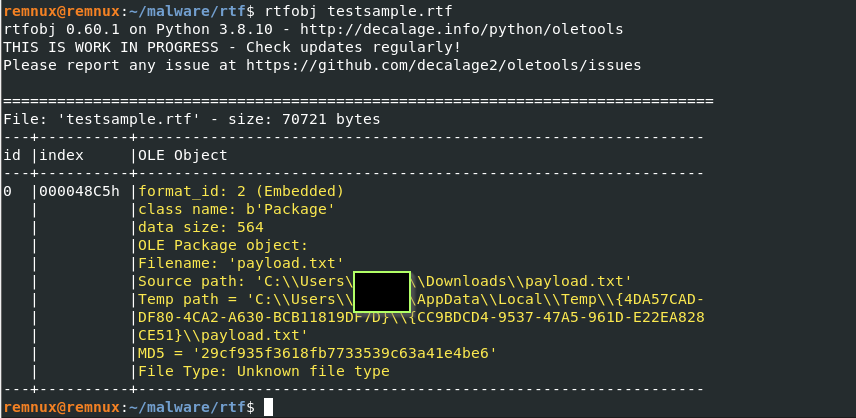
Note: When the RTF file is being created, along with the embedded package malicious OLE file, for example a payload, Microsoft Word automatically copies the object to the C:\Users\USER\AppData\Local\Temp\ path. If the TA for some reason tests the weaponized file and clicks the packaged object, the Temp path in the rtfobj tool output will come as C:\Users\USER\AppData\Local\Temp\ plus the GUID directories such as {4DA57CAD-DF80-4CA2-A630-BCB11819DF7D}{CC9BDCD4-9537-47A5-961D-E22EA828CE51} and the payload inside those, otherwise the Temp path will come simply as C:\Users\USER\AppData\Local\Temp\payload.
There are some awesome visuals from Ange Albertini aka corkami which can show us the doc structure of RTF docs:

The RTF doc is composed of Control Words and Groups. Control words start with \ char, and Groups are delimited by { }. Groups can be nested and contain one or more control words. Groups also contain data and specifications on how that data should be formatted and displayed. Sometimes you will see a \result control word, this is where the specification of how the data of the object should be diplayed, the data of the object will be located after the \objdata and before the \result.
Example: \object is the control word which indicate the start of an embedded object
The objects inside the RTF can be Linked file, which consists of a remote file, not stored within the RTF, using URL; And they can be Embedded file which is raw binary data stored directly within the RTF and inside \object; and finally they can also contain Macintosh Edition Manager subscriber objects.
Note: \object and \pict are by default embedded as hexadecimal values
Techniques
There are several weaponizing and obfuscation techniques for RTF documents. On the blog, I will try to talk about the most common ones.
- Embedded OLE Objects
- Equation Editor exploits
- pFragments
- Image embedding
- Remote template injection\OLE linking
Analysis
Tools
- rtfobj (Philippe Lagadec)
- rtfdump (Didier Stevens)
- remnux (Lenny Zeltser)
Sample
for later in the post
SHA256:
866a9be2f90b18f54c623063b0c533804aa0eb1217e334b2cb033348422ecdf5
Embedded OLE Objects
Malicious OLE Package
The actions observed on this technique are based on using the RTF document as a container to embed any arbitrary file (exe, dll, hta, msi, etc..) so that when the object is triggered Windows OS runs it.
There are variations of these, TAs can simply embed the files without tweaks, and they can also edit the metadata of the files for social engineering purposes, make the icon more pleasing to the naive double click. The only technical difference in both is how the payload is presented to the victim.
Here the rtfobj output of a weaponized Malicious (not very malicious just test) OLE Package:
Simple cat command:

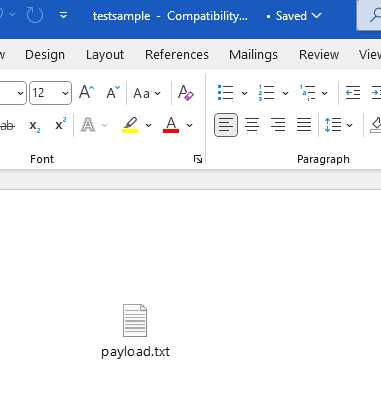
Very simple, modest payload, however it can be tweaked to look like beautiful Mole, that some user would just Whac, without second thought:
Embedded Office Doc
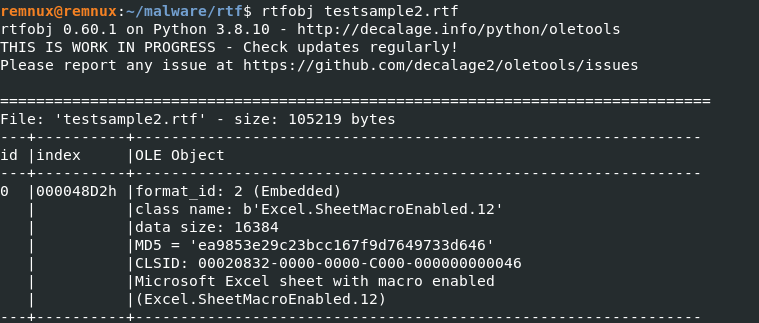
The difference to the previous technique is that the RTF document acts as wrapper to another entire office document (docx, xls) which then would contain other malicious payloads based on VBA, DDE, XLM, etc.., hence creating a OLE2 object.
The victim clicks the embedded object and Word runs it not Windows OS.
For demo purposes we will implant some VBA code inside an excel file that tries to run calc.exe on the system, the excel file will then be wrapped by a RTF doc.
If we do a simple cat command on the file, we can see the difference towards the previous variant:

D0 CF 11 E0 A1 B1 1A E1 -> is the magic number or file signature for OLE Compound File Binary Format (CFBF) or OLE2
We can also observe the difference in rtfobj output:
Equation Editor exploits
These exploits target a Microsoft Word feature called Equation editor, which is a built-in tool for inserting and editing mathematical equations. When parsing the RTF document via MS Word for example, MS Word observes the \objclass Equation.3, and hands it off to EQNEDT32.EXE, where the buffer overflow vulnerability exists which results on RCE.
Classic CVEs about it:
- CVE-2017-11882
- CVE-2018-0802
- CVE-2018-0798
So far, I have used test samples, in order to better demo the points in discussion, however for this one we will use a real in the wild sample mentioned above.
ID 101
You can also use magika to ID the file that we are about to analyze. In our case the extension is .rtf however it could not always be the case. Extension is the boss. There is a insanely good talk from Philippe Lagadec on how to better identify first stage malware file formats on Hack.lu 2025, which talks about file format identification tools and its qwirks.
trid malsample.rtf
file malsample.rtf
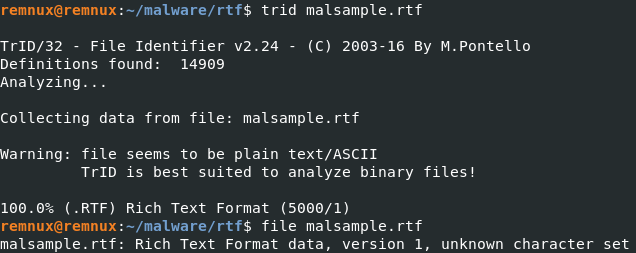
Let’s start with rtfobj to save all the objects from the RTF doc at once into the current directory, while displaying what it finds:
rtfobj malsample.rtf -s all
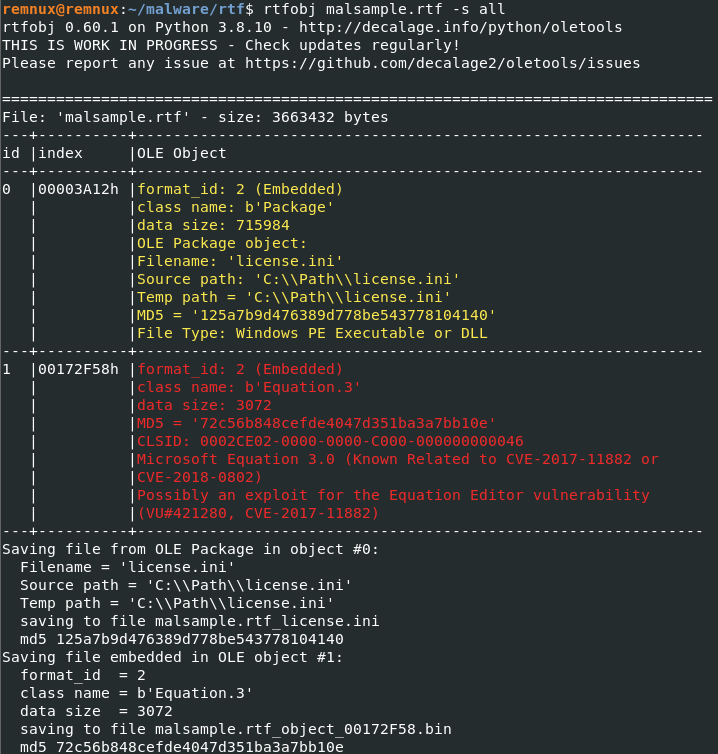
So in this case, its possible to see two objects:
- The Equation exploit
- A second object that appears to be a PE/DLL
We can also use rtfdump to get this observations:
rtfdump.py malsample.rtf
With this command above we can better observe how many nested groups there are and how many childs (c=) each groups has. We can also identify on the output two objects.
rtfdump.py -O malsample.rtf
rtfdump.py -O -s 1 malsample.rtf
With these commands you will be able to look deeper into the Equation OLE2 object:
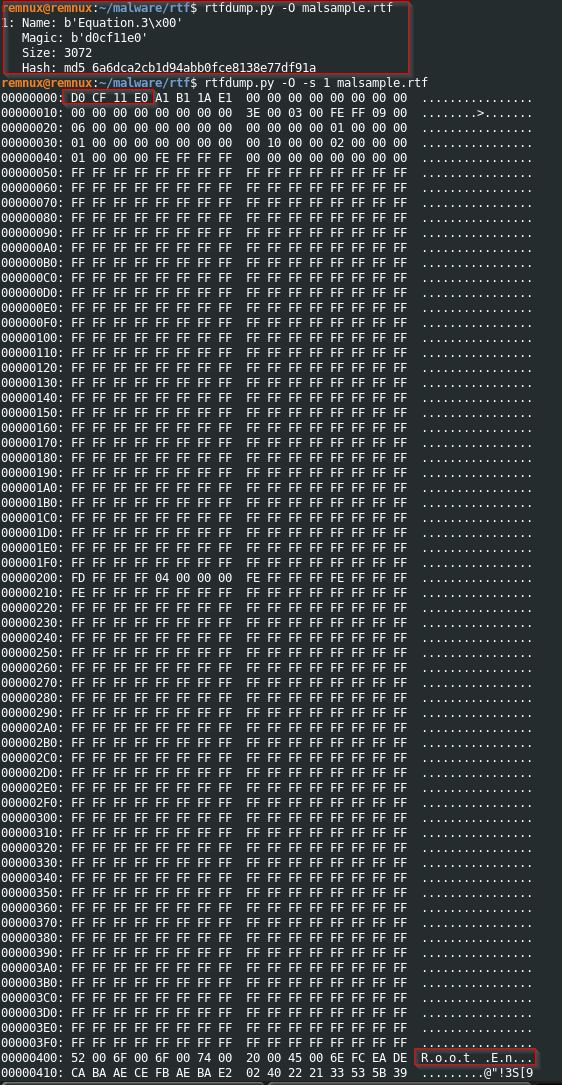
There are multiple cool things you can do with rtfdump, cut specific offsets of the stream for better analysis and so on, however for this specific sample I found it more easy to work with rtfobj, or my rtfdump skills are not as good maybe. But you can check more about it in the following SANS article.
Now, there are some friends of mine which are going to go mental for the next thing I will say, but a word of advice, use what makes you better and faster. Lets use vscode! :)
Take a look at both objects:
Object 1:
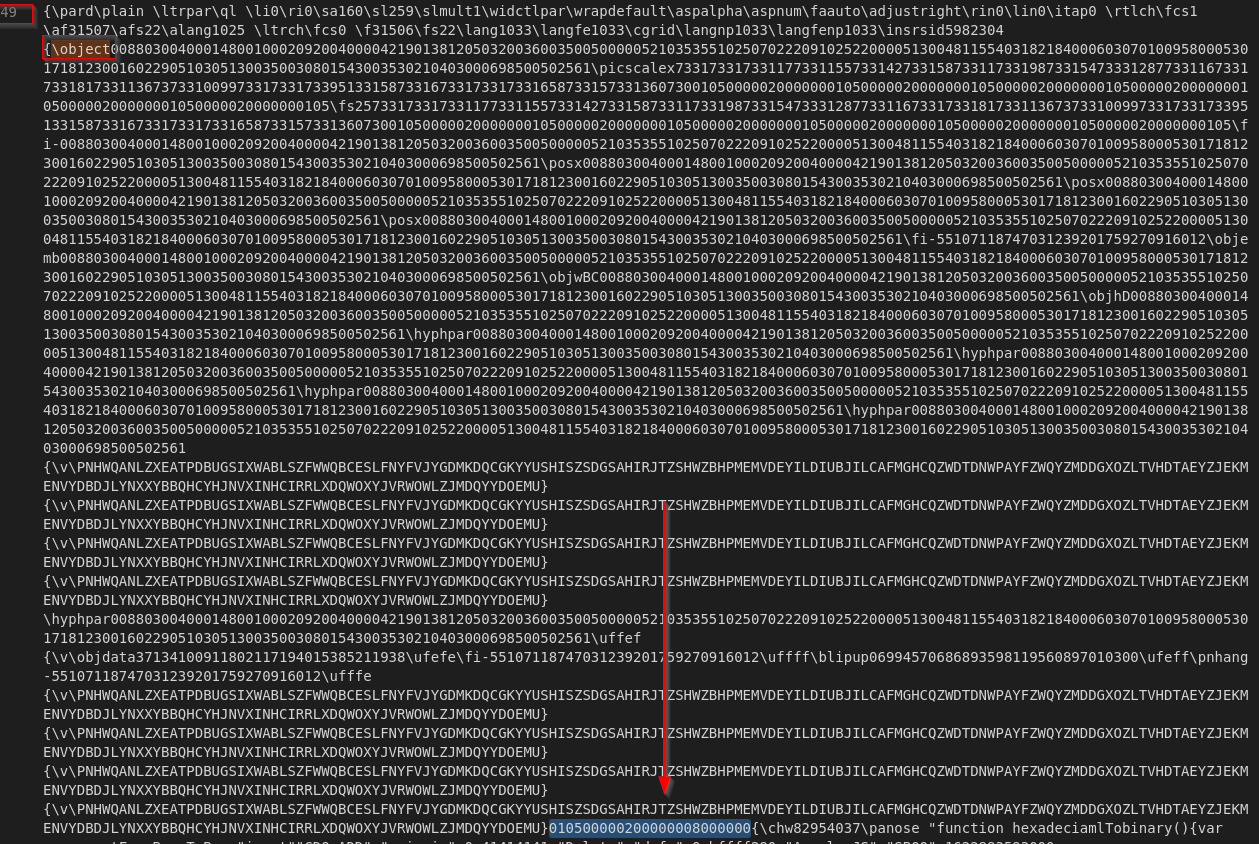
Object 2:
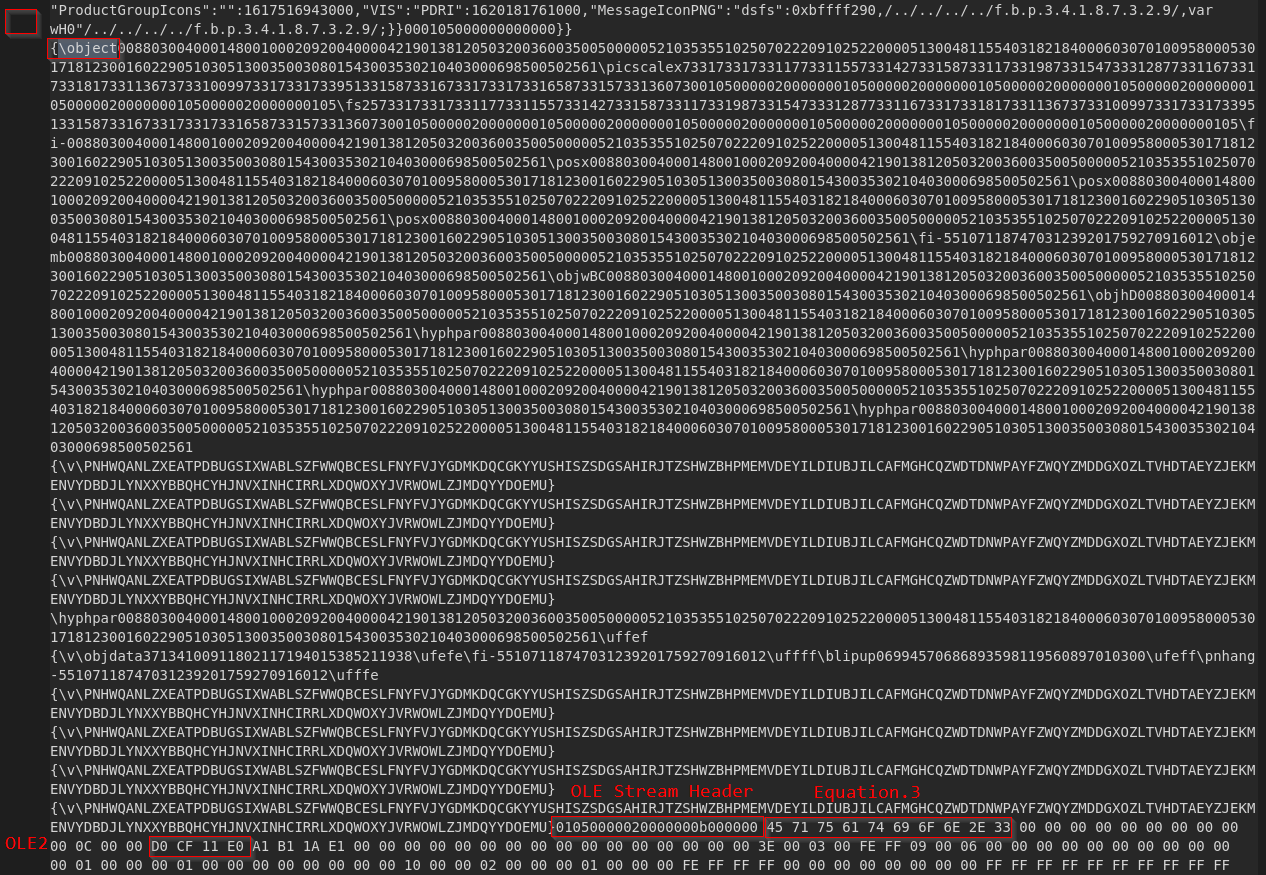
The interesting thing here is that in both images we are able to see the hex string with 4 bytes 01050000 and 4 bytes 02000000 in little-endian. Looking at the OLE Object header official structure in MS Doc we can understand that this hex string marks the start of a OLE Object header.
01050000 - OLE Version (Must be ignored as per Microsoft)
02000000 - FormatID
The table in MS doc tells us the meaning of FormatID:

The OLE object header is another funny thing in the Microsoft world, the structure fields following FormatID are equally interesting, but I will maybe talk about it in another post.
After extracting both objects using rtfobj we move on and inspect the binary extracted using xxd:
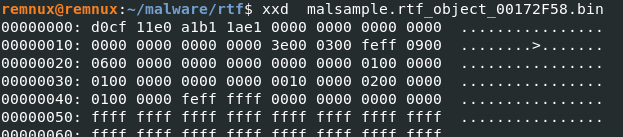
Scroll down and we something even more interesting, and we can xxd to look at it better:

xxd -g1 -s 0x920 -l 80 <filename>.bin
After the exploit successfully triggers, the second object extracted from the RTF, now confirmed to be a DLL based on the observed command execution, is loaded and executed via rundll32.exe.
md5sum <filename>.bin
The analysis of this sample is out of the scope of the post, but if it proves to be a interesting sample I will talk more about it in another post.
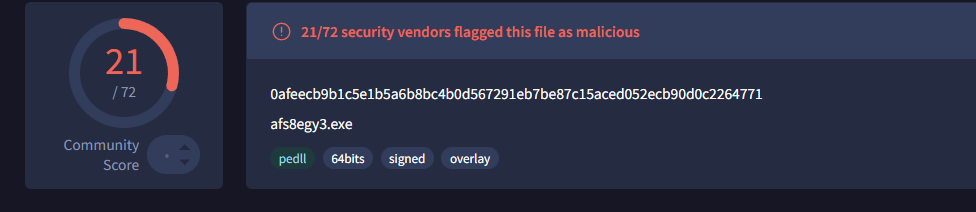
After submission in VT, for example we can see the malicious indicators.
If you noticed something wrong or just interested in asking something - 0xrain@protonmail.com