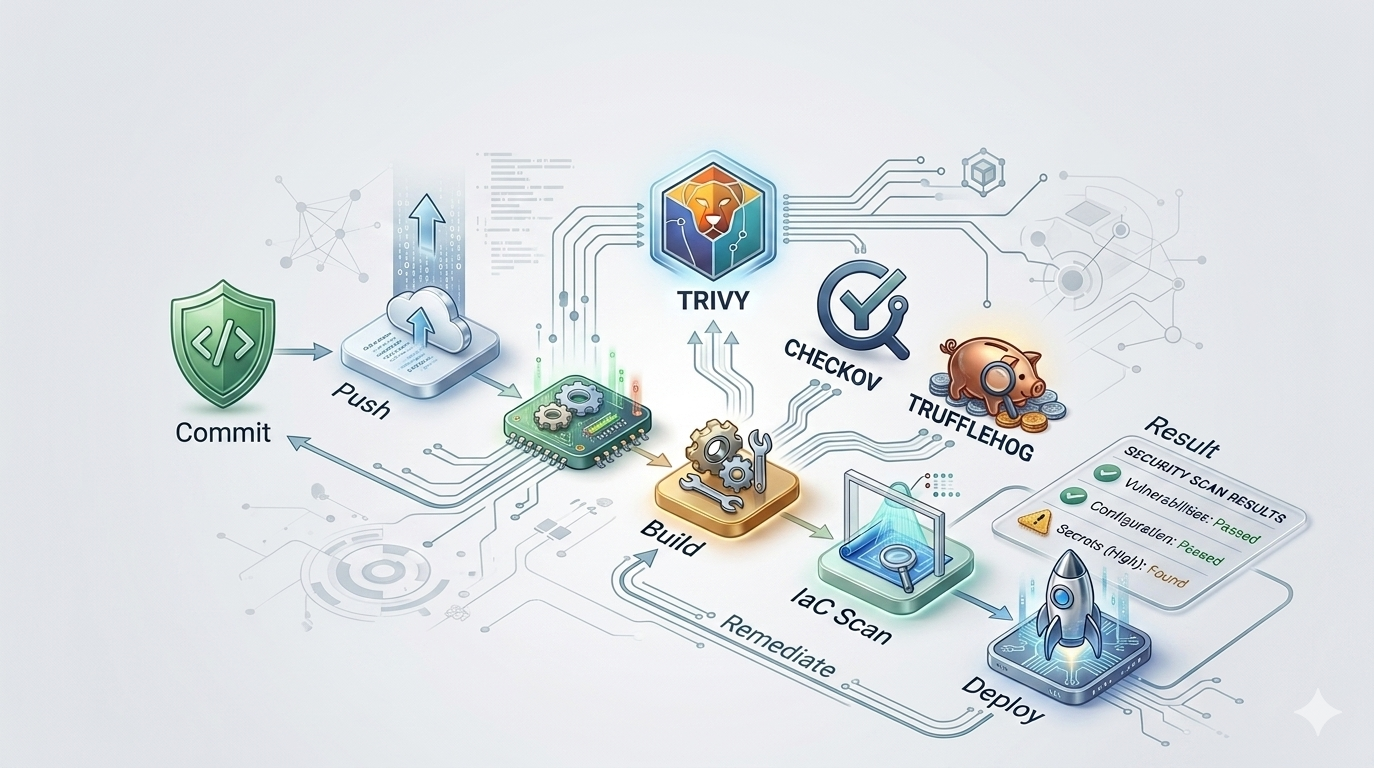
Back for the part two, where I will automate the security scanning of manually written IaC files, when these are pushed into a repository on github leveraging github worflows. I will go through some of the major security misconfigurations, existing threat vectors and solutions to mitigate them. Using semgrep for a specific scenario where other tools limitations hinder us.
Code source: https://github.com/rgxsec/marizaws-project
Tools:
- Checkov
- Trivy
- TruffleHog
- Semgrep
Each of this tools has its own special skill, checkov speciality is to map misconfig findings to compliance standards like CIS AWS Benchmark, NIST, SOC2, PCI-DSS ect, besides having a very large library of built-in policies for Terraform; trivy is more like a swiss army knife, it can scan anything, dockerfiles, container images, kubernetes manifests etc, it also links the findings to real CVEs and attack threats; trufflehog is superb at looking and finding secrets and credentials in specific formats on IaC files and also in git history. Semgrep highly customizable, rule based for each dedicated circunstance or problem.
Architecture:
For the 2nd part, I decided to create from scratch and on my own the infrastructure. I created a VPC with two subnets, one private and one public, where we have multiple workloads on each subnet, some with its misconfigurations left on purpose. This is a pretty common architecture for some websites and web applications.
You can observe the infrastructure we are creating with Terraform in the following image.
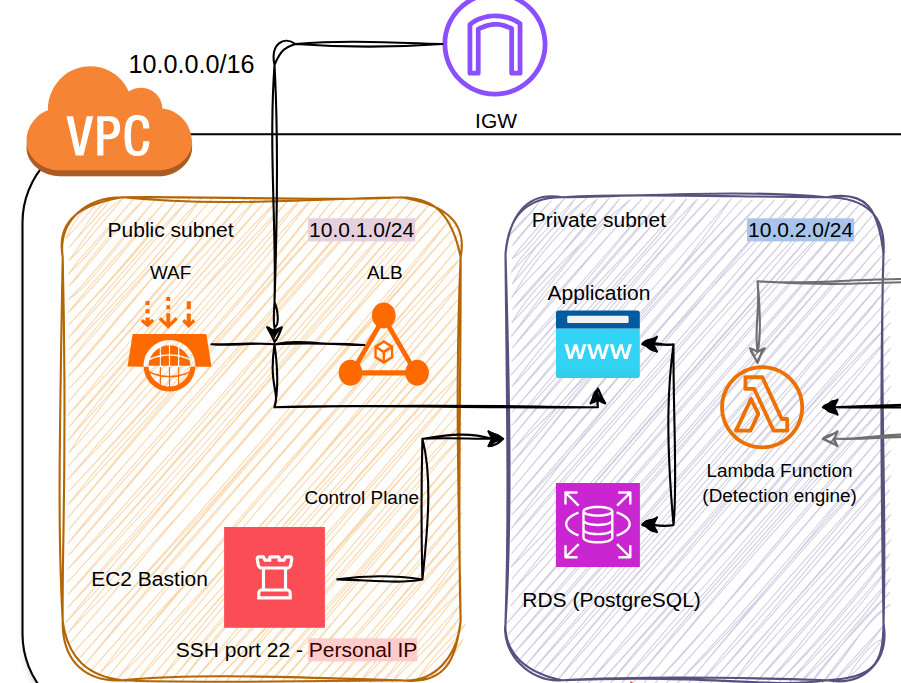
However its possible that by the time you check it the misconfigs are already fixed or code is different somehow.
Automated Scanning Workflow
I’m going to use Github Actions to build the scanning pipeline for the Terraform files.
I will create two triggers, one for the push and another for the pull request to the main branch.
I will then declare three jobs, one for each tool, where we will fecth the action repository for each tool to run against our terraform code in a ubuntu container and output the results of the scan.
We are configuring checkov and trivy to not fail during the push, so we can get the full scan result instead of the pipeline just stopping at the first one.
name: Terraform Security Scan

on:
  push:
    branches:
      - test
  pull_request:
    branches:
      - main

jobs:
  security-scan:
    runs-on: ubuntu-latest

    steps:
      - name: Checkout code
        uses: actions/checkout@v4

      - name: Run Checkov
        uses: bridgecrewio/checkov-action@master
        with:
          directory: terraform/
          framework: terraform
          soft_fail: true

      - name: Run Trivy
        uses: aquasecurity/trivy-action@master
        with:
          scan-type: config
          scan-ref: terraform/
          exit-code: '0'

      - name: Run TruffleHog
        uses: trufflesecurity/trufflehog@main
        with:
          path: ./
By pushing the code on test branch we can observe several fails from our scanning pipeline. I later added the Semgrep job.
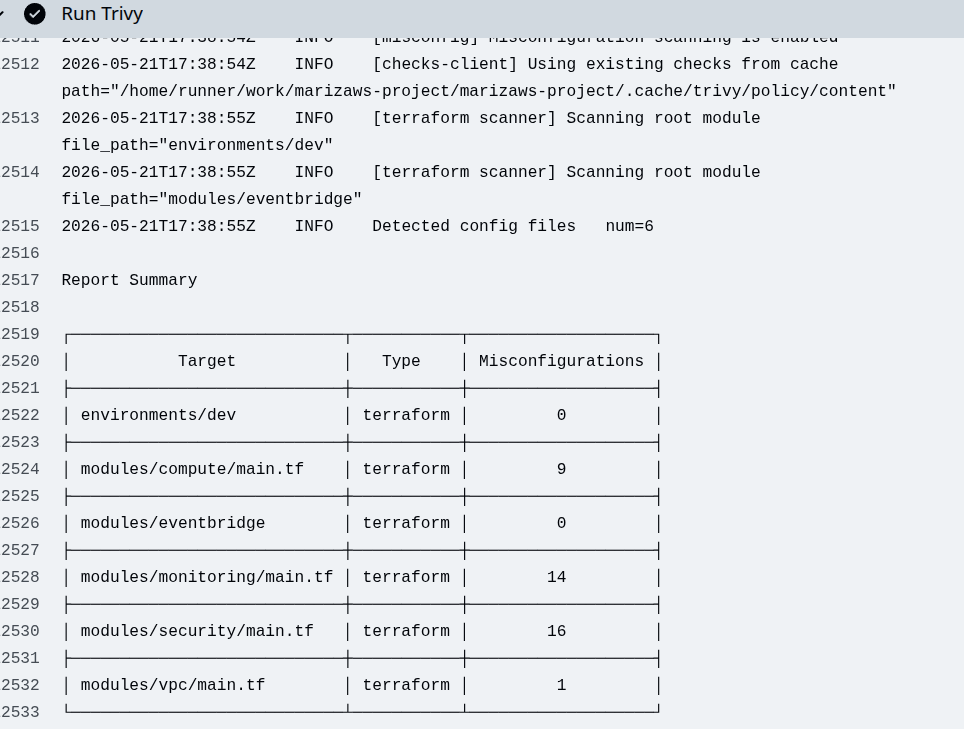
Here we have our pipeline misconfig alerts:
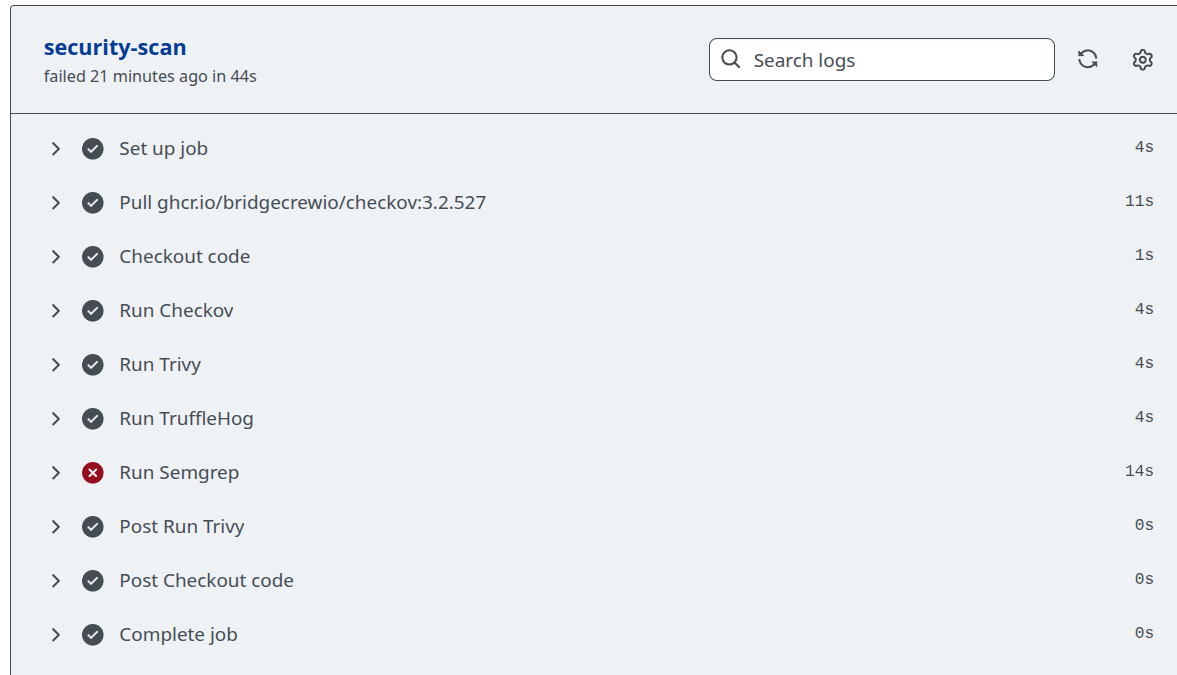
Checkov:
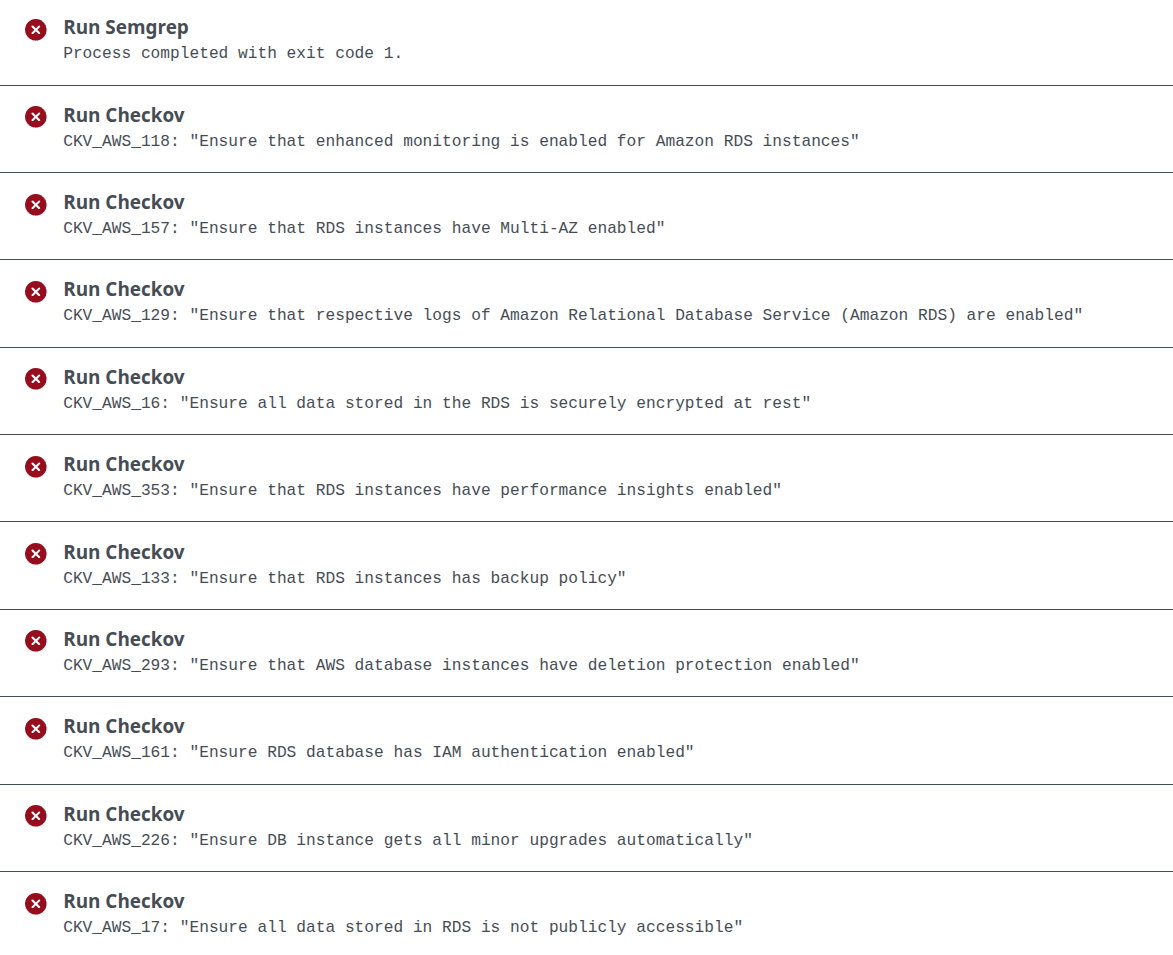
Trivy:
Attack vectors, Detection & Solution
Attack vector: Hardcoded credential
Hardcoded credentials on pushed code to public resources are a huge problem for companies, Threat Actors scour public sources in search of such golden nuggets.
Status: Downloaded newer image for ghcr.io/trufflesecurity/trufflehog:latest
🐷🔑🐷  TruffleHog. Unearth your secrets. 🐷🔑🐷

2026-05-02T17:46:21Z	info-0	trufflehog	running source	{"source_manager_worker_id": "YyJDy", "with_units": true}
2026-05-02T17:46:21Z	info-0	trufflehog	scanning repo	{"source_manager_worker_id": "YyJDy", "unit_kind": "dir", "unit": "/tmp/trufflehog-18-1384086554", "repo": "file:///tmp", "head": "9fbdc258e720ec1d45e8018d182c969e90068246"}
2026-05-02T17:46:21Z	info-0	trufflehog	finished scanning	{"chunks": 19, "bytes": 19823, "verified_secrets": 0, "unverified_secrets": 0, "scan_duration": "38.542984ms", "trufflehog_version": "3.95.2", "verification_caching": {"Hits":0,"Misses":0,"HitsWasted":0,"AttemptsSaved":0,"VerificationTimeSpentMS":0}}
So it seems trufflehog did not capture our hardcoded credential:
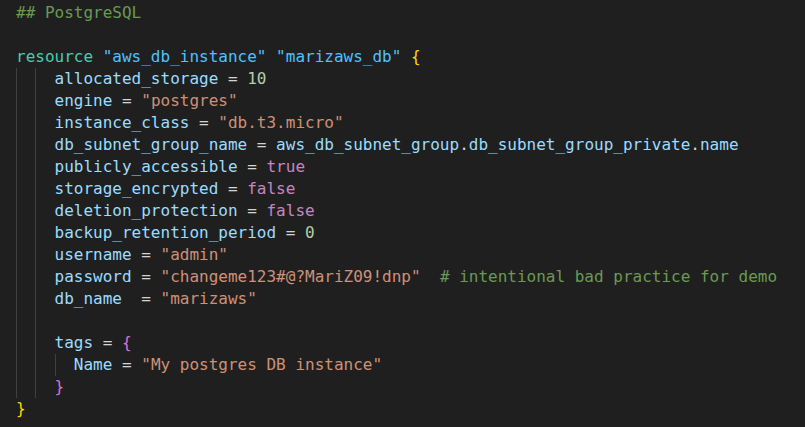
In the case of our code, the database instance is publicly accessible (another misconfig), which means that our RDS is on the open in port 5432, and could compromised, threat actor scan could have landed him the DB password and user.
It seems that TruffleHog has this limitation for generic hardcoded credentials, checking issues in its report I came by a recent one with a similar problem albeit in a different file format here.
Solution:
- The solution for this attack vector is including very good detection layers so that credentials and secrets dont end up in public repos or in places where they shouldn’t, so just remove them from config files.
Detection:
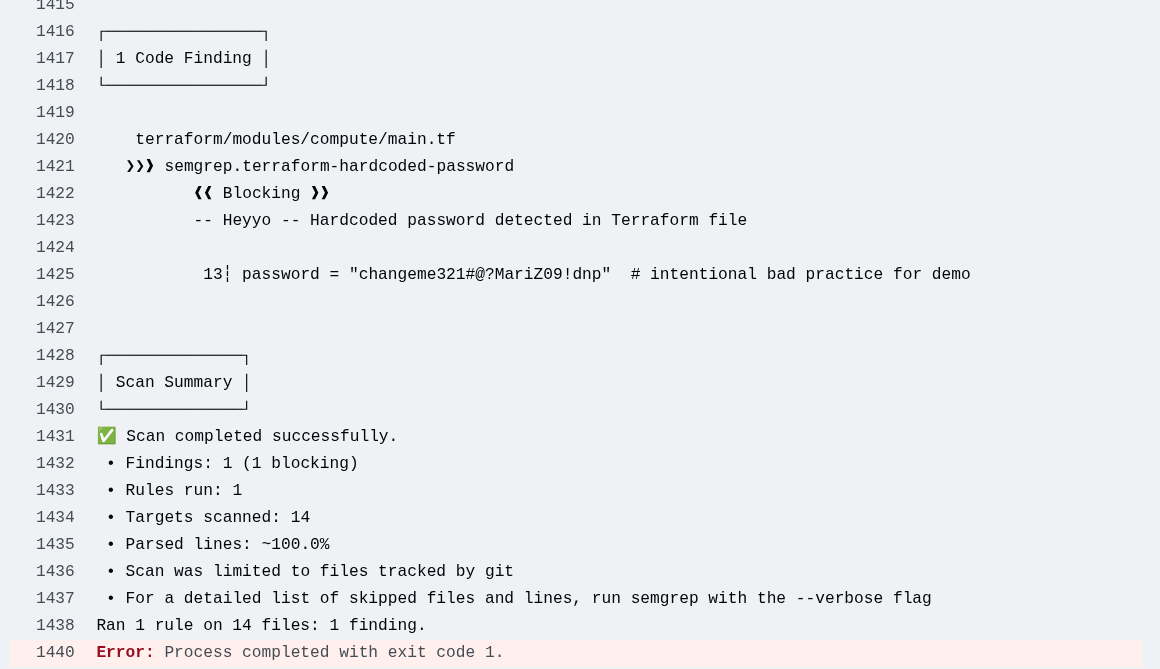
- In order to add a detection layer for this generic hardcoded secrets/credentials I suggest using something more customizable where you can write a rule for your exact scenario and still run it in a Github Action, recommending Semgrep, pip install it and run it on the runner.
On Github Action
      - name: Run Semgrep
        run: |
          pip install semgrep
          semgrep --config .semgrep/rules.yml terraform/ --error
Rules
rules:
  - id: terraform-hardcoded-password
    patterns:
      - pattern: |
          password = "$VALUE"
    message: -- Heyyo -- Hardcoded password detected in Terraform file
    languages: [hcl]
    severity: ERROR
Detection
Attack vector: Overly Permissive IAM Role
- Checkov: CKV_AWS_111
- Trivy: AWS-0345
In the compute module, when declaring the IAM role for the web application, we on purpose left it with S3 bucket full access.
This means that if the web application is compromised it has full on capabilities on S3 bucket resources of the account, reading, writing, deleting etc.
By using a SSRF attack the Threat Actor can trick the web application into making HTTP requests for him. It can craft a HTTP request to the IMDSv2 which can fetch the temporary credentials created for the Overly Permissive IAM Role.
- Permissive IAM Role
resource "aws_iam_role_policy_attachment" "app_s3_fullaccess_overlypermissive" {
  role       = aws_iam_role.app_role.name
  policy_arn = "arn:aws:iam::aws:policy/AmazonS3FullAccess"
}
Solution
The solution is to modify the role permissions according to the principle of least privilege.
In this case (demo), the web application connects to the RDS via PostgreSql connection string via user_data.sh, it does not need any permission or IAM role for that matter, so we can completly eliminate it.
However if something like reading from S3 was needed we could apply something like:
resource "aws_iam_role_policy" "app_s3_least_privilege" {
  name = "app-s3-least-privilege"
  role = aws_iam_role.app_role.id

  policy = jsonencode({
    Version = "2012-10-17"
    Statement = [
      {
        Effect   = "Allow"
        Action   = ["s3:GetObject", "s3:ListBucket"]
        Resource = [
          "arn:aws:s3:::your-specific-bucket",
          "arn:aws:s3:::your-specific-bucket/*"
        ]
      }
    ]
  })
}
Attack Vector: IMDSv2 not enforced
- Checkov: CKV_AWS_79
- Trivy: AWS-0028
The IMDS stands for (Instance Metadata Service) and it allows to access instance metadata from an amazon EC2 resource.
You can access IMDSv1 or IMDSv2, IMDSv2 uses a session oriented method, enforcing the usage of authentication tokens for its operations, the IMDSv1 uses request/response methods and does not enforce or require tokens. Hence when IMDSv2 is not enforced it leaves the resources vulnerable, to crafty requests and fetch temporary role credentials as seen in the previous vector.
In the terraform configurations files we can observe that this attack vector exists, since we are not enforcing http tokens on the metadata options.
resource "aws_instance" "bastion-host" {
  ami = data.aws_ami.bastion_host_ami.id
  instance_type = "t3.micro"

  subnet_id = var.public_subnet_id
  vpc_security_group_ids = [aws_security_group.public_sg.id] ## this is a sg attachment

  metadata_options {
    http_tokens = "optional"
  }

  key_name = aws_key_pair.marizaws_keypair.key_name

  tags = {
   Name = "bastion-marizaws"
 }

}
Solution:
metadata_options {
  http_tokens                 = "required"
  http_endpoint               = "enabled"
  http_put_response_hop_limit = 1
}
Requiring HTTP tokens, declaring the endpoint with IMDS service enabled, and limiting network hops meaning that the request can only come from the instance itself, not from containers within the instance, which means 1 more hop away in the network layer, reducing blast radius if containers are compromised somehow, if you need it set it to 2.
Attack Vector: CloudTrail multi region configuration
- Checkov: CKV_AWS_67
- Trivy: AWS-0014
This attack vector is more about the detection gap we are creating on the AWS environment. Due to the inner workings of CloudTrail logging, by not enabling multi region, if the account is compromised somehow, attacker can take its nefarious operations to another region other than the one in which CloudTrail is enabled, originating a false sense of security.
Things it can do:
Setup infrastructure for malicious activitives such as phishing, multiple stage malware dropping, cryptomining etc.
Exfiltrating data to S3 buckets created in that region
Creating backdoor IAM users, roles that survive revoke actions and establish persistence that allow for nefarious activity and IR on primary region without alert
etc
Misconfig:
resource "aws_cloudtrail" "cloudtrail_marizaws" {
  name                          = "marizaws-cloudtrail"
  s3_bucket_name                = aws_s3_bucket.marizaws_bucket.id
  include_global_service_events = true
  cloud_watch_logs_group_arn    = "${aws_cloudwatch_log_group.cloudwatch_log_group_cloudtrail.arn}:*"
  cloud_watch_logs_role_arn     = aws_iam_role.cloud_trail_role.arn
}
Solution:
resource "aws_cloudtrail" "cloudtrail_marizaws" {
  name                          = "marizaws-cloudtrail"
  s3_bucket_name                = aws_s3_bucket.marizaws_bucket.id
  include_global_service_events = true
  is_multi_region_trail         = true
  enable_log_file_validation    = true
  cloud_watch_logs_group_arn    = "${aws_cloudwatch_log_group.cloudwatch_log_group_cloudtrail.arn}:*"
  cloud_watch_logs_role_arn     = aws_iam_role.cloud_trail_role.arn
}
Enbling log file validation is also a very good practice to establish an auditable capability.
Takeaway
This post shows a pipeline that can be setup, with the help of several tools, in order to automate the detection and scanning of Infrastructure as Code files.
The usage and adoption of cloud services and compute resources is growing by the minute, collaborators may develop this files manually or with the help of AI, however neither humans nor models are immune to misconfigurations that can put in danger an entire organizational infrastruture, moreover, companies operate under specific compliance requirements, regional laws, and internal policies that are difficult to fully encode into a general-purpose tool. Thats why a pipeline with tools that can look at several angles is helpful.
Several attack vectors that were triggered in the tools scan were analyzed, where the danger in these misconfigurations lies and how to mitigate them. Also looking at TruffleHog limitations and what alternatives we have for specific cases.
Cheers.