I decided to create this post since I was looking to cloud in a security perspective and noticed this would be a fun thing to try and get hands-on experience in CI\CD and the magical activity of Terraforming, uh seems so cool and wizardy.
Objective
The objective is to create a Terraform config file with insecure configs on purpose. Test code security scanning tools, such as checkov and tfsec and then in a part 2 in the comming future, hopefully ;) time is an elusive thing, automate the process using CI\CD pipelines, something like Github actions.
Tools
- Linux VM
- Tilix
- Github
- AWS cli
- Terraform
- checkov
- tfsec
- vscode
Terraform provision
With assistance of AI I built a badly and insecure Terraform provisioning file:
provider "aws" {
  region = "us-west-2"
}

# Insecure S3 bucket with public access
resource "aws_s3_bucket" "data_bucket" {
  bucket = "my-insecure-demo-bucket"
}

# Making the bucket public (this is a security issue)
resource "aws_s3_bucket_acl" "data_bucket_acl" {
  bucket = aws_s3_bucket.data_bucket.id
  acl    = "public-read"
}

# Unencrypted S3 bucket (another security issue)
resource "aws_s3_bucket_server_side_encryption_configuration" "example" {
  bucket = aws_s3_bucket.data_bucket.id

  rule {
    apply_server_side_encryption_by_default {
      sse_algorithm = "AES256"  # Not using KMS (considered less secure)
    }
  }
}

# IAM user with overly permissive policy
resource "aws_iam_user" "admin_user" {
  name = "admin-user"
}

# Insecure: Access keys created and stored in state file
resource "aws_iam_access_key" "admin_user_key" {
  user = aws_iam_user.admin_user.name
}

# Insecure: Overly permissive IAM policy
resource "aws_iam_user_policy" "admin_user_policy" {
  name = "admin-access"
  user = aws_iam_user.admin_user.name

  policy = <<EOF
{
  "Version": "2012-10-17",
  "Statement": [
    {
      "Effect": "Allow",
      "Action": "*",
      "Resource": "*"
    }
  ]
}
EOF
}

# Insecure security group allowing all inbound traffic
resource "aws_security_group" "allow_all" {
  name        = "allow_all"
  description = "Allow all inbound traffic"

  ingress {
    from_port   = 0
    to_port     = 0
    protocol    = "-1"
    cidr_blocks = ["0.0.0.0/0"]
  }

  egress {
    from_port   = 0
    to_port     = 0
    protocol    = "-1"
    cidr_blocks = ["0.0.0.0/0"]
  }
}

# EC2 instance with no encrypted EBS volumes
resource "aws_instance" "web_server" {
  ami           = "ami-0c55b159cbfafe1f0"  # Example AMI ID
  instance_type = "t2.micro"

  # Not specifying security groups - will use default

  # Not enabling detailed monitoring
  monitoring = false

  # Not encrypting EBS volumes
  root_block_device {
    volume_size = 8
    encrypted   = false
  }

  tags = {
    Name = "insecure-instance"
  }
}
The file contains overly permissive permissions, no encryption configurations for EC2 and S3 buckets, permissive network security group configurations, access keys stored in state files.
Security Implications
Insecure S3 bucket with public access
- Setting ACL as “public-read” on a S3 bucket implies object is publicly readable
- Can violate corporate policies and region compliance policies, and also AWS best practices
Unencrypted S3 bucket *( )
If we run the first code security scanning tool checkov we get the following output:
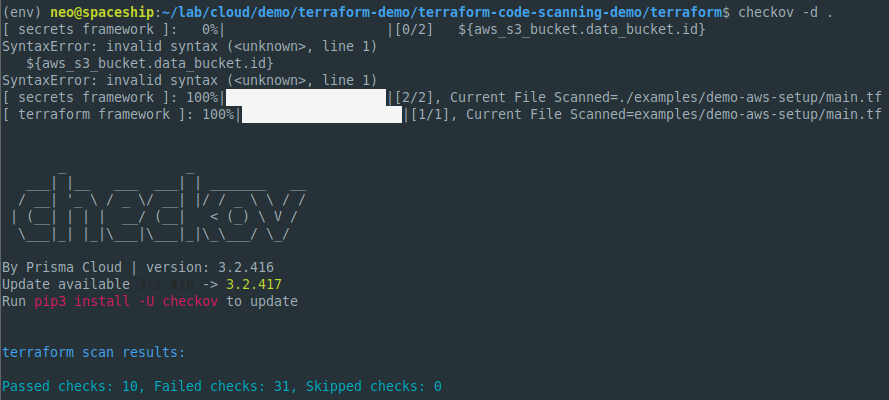
- 10 - Passed
- 31 - Failed
As for tfsec we get a slightly different output however:
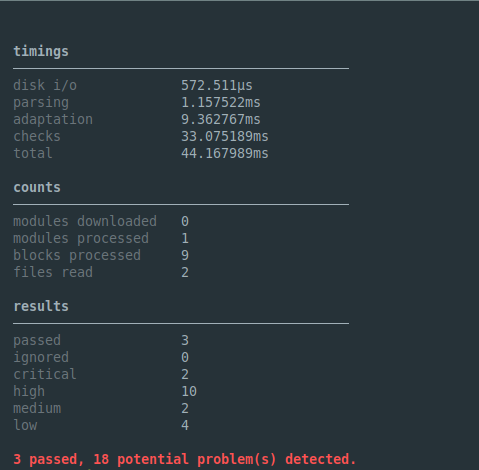
- 3 - Passed
- 18 - Failed
Based on these results we can safely assume that this is not a well configured provision file and that IaC scanning tools can indeed detect these faillures.
As in many infosec fields using more than one tool for the same analysis task can be advantageous since tools can look for different details and have slightly different results.
So. cool. now, how can we automate this? Lets check on upcoming part 2.